Master API Rate Limiting for Multi-Tenant SaaS Platforms
Explore essential strategies for implementing API rate limiting in multi-tenant SaaS platforms. Learn how to balance resource allocation, prevent abuse, and ensure fair usage across tenants.

Zakariae

When you build a multi-tenant SaaS platform, one of the most critical architectural decisions you will face involves controlling how tenants consume your API resources. Without proper safeguards, a single tenant experiencing a traffic spike or engaging in abusive behavior can bring down your entire platform, affecting every customer who depends on your service. This challenge becomes exponentially more complex when you are operating a no-code platform where clients build their own applications, each potentially generating unpredictable API traffic patterns.
The solution lies in implementing robust api rate limiting strategies that protect your infrastructure while ensuring fair resource distribution across all tenants. Whether you are building a directory platform, an app builder, or any other multi-tenant solution, understanding how to implement, configure, and scale rate limiting will determine whether your platform thrives or crumbles under real-world usage conditions.
Key Takeaways
- Rate limiting is essential for multi-tenant fairness, preventing any single tenant from monopolizing shared resources and degrading service for others.
- Different algorithms serve different purposes: token bucket handles bursts well, leaky bucket smooths traffic, and sliding window provides precise tracking.
- Tier-based rate limits align with business models, allowing you to monetize API access while providing appropriate service levels to each customer segment.
- Dynamic rate limiting adapts to real-time conditions, automatically adjusting limits based on system load, time of day, or tenant behavior patterns.
- Proper error handling and communication through HTTP headers and clear error messages improves developer experience and reduces support burden.
- Distributed rate limiting requires careful architecture to maintain consistency across multiple server instances and geographic regions.
- Monitoring and alerting systems help you identify problematic tenants and optimize rate limit configurations over time.
Understanding the Multi-Tenant Rate Limiting Challenge
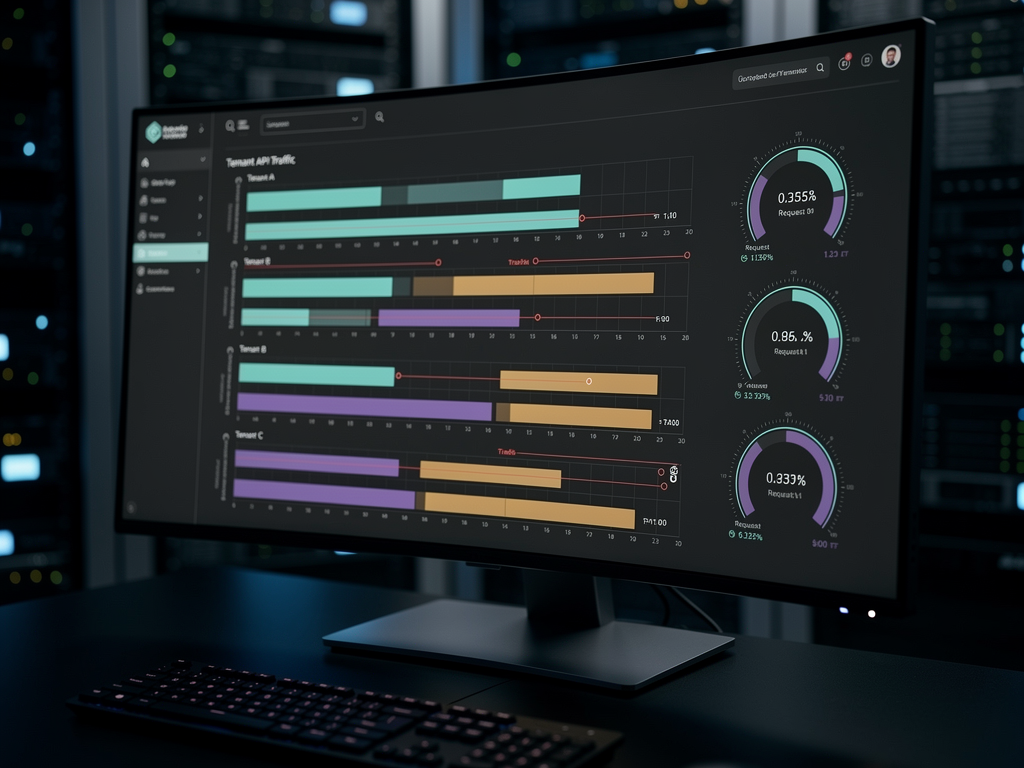
Multi-tenant APIs face an inherent tension that single-tenant applications never encounter: maximizing resource utilization while preventing any single tenant from negatively impacting others. When you operate a platform where dozens, hundreds, or thousands of tenants share the same infrastructure, you must balance competing interests constantly. A tenant running a successful marketing campaign might legitimately need more API calls, while another tenant might be misconfigured and hammering your endpoints with redundant requests.
The complexity multiplies when you consider that each tenant in a no-code platform might have their own users making API calls. You are not just managing tenant-level limits but potentially user-level limits within each tenant context. This hierarchical structure requires sophisticated rate limiting strategies that can enforce limits at multiple levels simultaneously without creating bottlenecks or inconsistent behavior.
Traditional rate limiting approaches designed for single-tenant applications often fall short in multi-tenant environments. A global rate limit that restricts all traffic to 10,000 requests per minute might seem reasonable until you realize that one aggressive tenant could consume the entire quota, leaving nothing for your other customers. Per-tenant isolation becomes essential, but implementing it efficiently at scale introduces its own challenges around state management, distributed coordination, and performance overhead.
Furthermore, multi-tenant platforms typically offer different service tiers with varying rate limits. Your free tier might allow 1,000 API calls per day, while your enterprise customers expect 250,000 calls or more. Managing these tiered limits while maintaining system stability requires careful architectural planning and robust implementation strategies that go far beyond simple request counting.
Core Rate Limiting Algorithms Explained
Before implementing rate limiting in your platform, you need to understand the fundamental algorithms available and their trade-offs. Each algorithm has distinct characteristics that make it more suitable for certain use cases, and choosing the wrong one can lead to either overly restrictive limits that frustrate legitimate users or overly permissive limits that fail to protect your system.
Token Bucket Algorithm
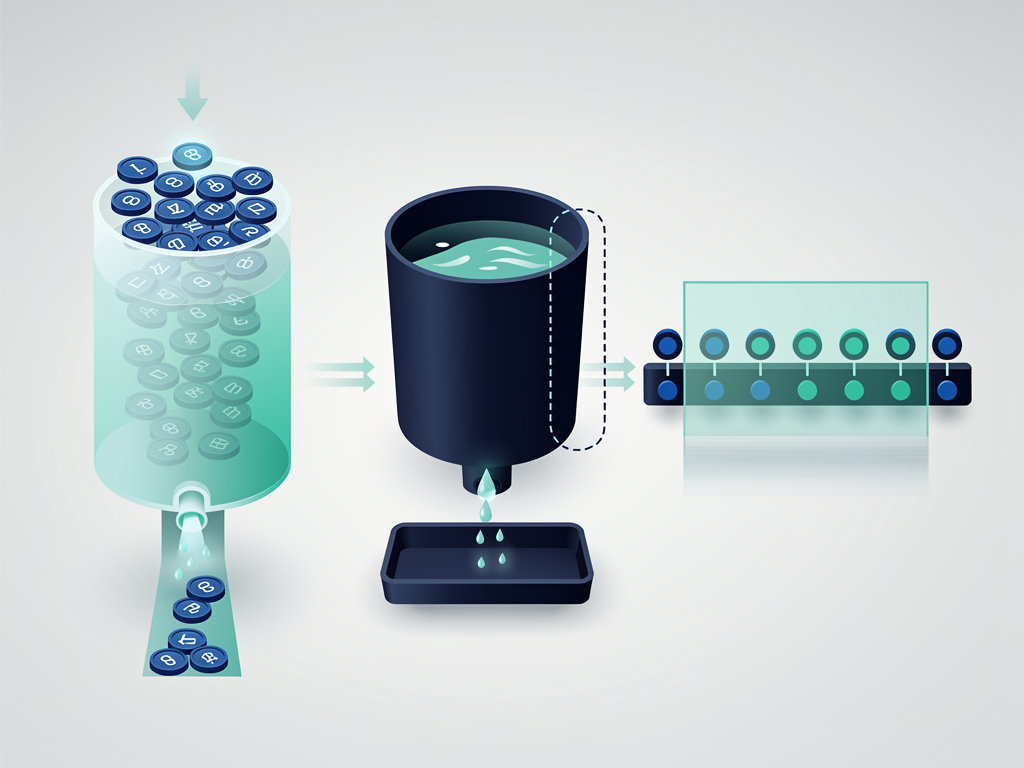
The token bucket algorithm remains one of the most popular choices for API rate limiting due to its elegant handling of burst traffic. Imagine each tenant has a bucket that fills with tokens at a steady rate. Every API request consumes one token from the bucket. If the bucket is empty, the request is rejected or queued. The bucket has a maximum capacity, which determines how much burst traffic the tenant can generate.
For example, you might configure a bucket that holds 1,000 tokens and refills at 100 tokens per minute. A tenant could make 1,000 requests immediately if their bucket is full, but then they would need to wait for tokens to refill. This approach works well for applications with legitimate burst patterns, such as a tenant syncing data after being offline or processing a batch of user actions.
| Parameter | Description | Example Value |
|---|---|---|
| Bucket Size | Maximum tokens the bucket can hold | 1,000 tokens |
| Refill Rate | Tokens added per time unit | 100 tokens/minute |
| Burst Allowance | Maximum instant consumption | 200 requests |
Leaky Bucket Algorithm
The leaky bucket algorithm takes a different approach by processing requests at a constant rate, regardless of how they arrive. Incoming requests enter a queue (the bucket), and the system processes them at a fixed rate (the leak). If the bucket overflows because requests arrive faster than they can be processed, excess requests are dropped.
This algorithm excels at smoothing traffic spikes and ensuring consistent backend load. If your downstream services or databases have strict throughput limits, the leaky bucket prevents sudden surges from overwhelming them. However, it can feel less responsive to users because even legitimate burst traffic must wait in the queue rather than being processed immediately.
Sliding Window Algorithms
Sliding window algorithms address a common problem with fixed window rate limiting: the boundary condition. With a fixed window that resets every minute, a tenant could make 1,000 requests at 11:59:59 and another 1,000 at 12:00:01, effectively doubling their rate limit around the window boundary. Sliding window algorithms solve this by tracking requests over a continuously moving time frame.
The sliding window counter method divides time into smaller segments and weights recent segments more heavily. The sliding window log method records the timestamp of every request and counts how many fall within the current window. The log method provides the most accurate rate limiting but consumes more memory, making it less suitable for high-volume scenarios with many tenants.
Designing Tiered Rate Limits for Your Business Model
Rate limiting is not purely a technical concern; it directly impacts your business model and customer relationships. The limits you set communicate value to your customers and create natural upgrade paths from free tiers to paid plans. A well-designed tier structure balances generous limits that attract users with restrictions that encourage upgrades and protect your margins.
When designing your tier structure, start by analyzing your actual costs per API call. Consider compute resources, database queries, bandwidth, and any third-party API costs your platform incurs. Understanding your cost structure helps you set limits that remain profitable at each tier while providing genuine value to customers.
| Tier Level | Daily Request Limit | Burst Allowance | Concurrent Connections | Typical Use Case |
|---|---|---|---|---|
| Free | 1,000 | 50/minute | 5 | Evaluation and hobby projects |
| Starter | 10,000 | 200/minute | 25 | Small applications and MVPs |
| Professional | 50,000 | 500/minute | 100 | Growing businesses |
| Enterprise | 250,000 | 2,500/minute | 500 | Large-scale deployments |
| Custom | Negotiated | Negotiated | Negotiated | Special requirements |
Consider implementing soft limits and hard limits within each tier. Soft limits trigger warnings and usage notifications, giving tenants time to optimize their usage or upgrade before hitting hard limits that actually block requests. This approach reduces frustration and support tickets while still protecting your infrastructure.
For platforms built with a SaaS boilerplate or SaaS template, you often have the advantage of pre-built tier management systems that you can customize for your specific needs. These foundations handle the complexity of tracking usage across billing periods, applying tier-specific limits, and managing upgrades and downgrades.
Implementing Rate Limiting in Next.js Applications
If you are building your multi-tenant platform with Next.js, you have several options for implementing rate limiting. The approach you choose depends on your deployment environment, scale requirements, and whether you need distributed rate limiting across multiple server instances.
Middleware-Based Rate Limiting
Next.js middleware provides an excellent interception point for rate limiting because it runs before your route handlers and can block requests early in the request lifecycle. By implementing rate limiting in middleware, you avoid wasting compute resources on requests that will ultimately be rejected.
A basic middleware implementation might use an in-memory store for development and testing, but production deployments require a distributed store like Redis to maintain consistent rate limit state across multiple server instances. When you deploy to serverless environments or scale horizontally, each instance needs access to the same rate limit counters.
Pro Tip: When building with a Next.js boilerplate or Next.js starter kit, check whether rate limiting middleware is already included. Many production-ready boilerplates include configurable rate limiting that you can customize rather than building from scratch.
API Route-Level Implementation
For more granular control, you can implement rate limiting at the individual API route level. This approach allows different endpoints to have different limits based on their resource intensity. A simple read operation might allow 1,000 requests per minute, while a complex report generation endpoint might be limited to 10 requests per minute.
Route-level rate limiting also enables you to apply different algorithms to different endpoints. You might use a token bucket for general API access to accommodate burst traffic, while using a leaky bucket for webhook delivery endpoints where consistent throughput matters more than burst capacity.

Tenant Identification and Isolation Strategies
Effective multi-tenant rate limiting requires reliable tenant identification. You cannot enforce per-tenant limits if you cannot accurately determine which tenant is making each request. Several identification strategies exist, each with trade-offs around security, performance, and implementation complexity.
API Key-Based Identification
API keys remain the most common tenant identification method for server-to-server API calls. Each tenant receives one or more API keys that they include in request headers. Your rate limiting middleware extracts the key, looks up the associated tenant and their tier, and applies appropriate limits.
When implementing API key-based identification, consider supporting multiple keys per tenant for different environments (development, staging, production) or different applications. Allow tenants to rotate keys without downtime and implement key revocation for compromised credentials. Store keys securely using one-way hashing, similar to password storage.
JWT Token-Based Identification
For platforms where end users authenticate directly, JWT tokens can carry tenant and user information that your rate limiting system uses. The token might include a tenant ID claim that your middleware extracts without requiring a database lookup for every request.
This approach works well when you need to enforce both tenant-level and user-level rate limits. A tenant might have an overall limit of 50,000 requests per day, while individual users within that tenant are limited to 5,000 requests per day. The JWT contains both identifiers, allowing your rate limiter to check and enforce both limits.
Subdomain-Based Identification
Multi-tenant platforms that provide custom subdomains for each tenant can use the subdomain itself for tenant identification. When a request arrives at tenant-name.yourplatform.com, you extract the subdomain and use it to look up the tenant context. This approach is particularly relevant for no-code platforms where each tenant has their own branded subdomain.
Subdomain-based identification integrates naturally with platforms built using a multi-tenant boilerplate that already handles subdomain routing and tenant resolution. The rate limiting layer simply hooks into the existing tenant context rather than implementing separate identification logic.
Distributed Rate Limiting Architecture
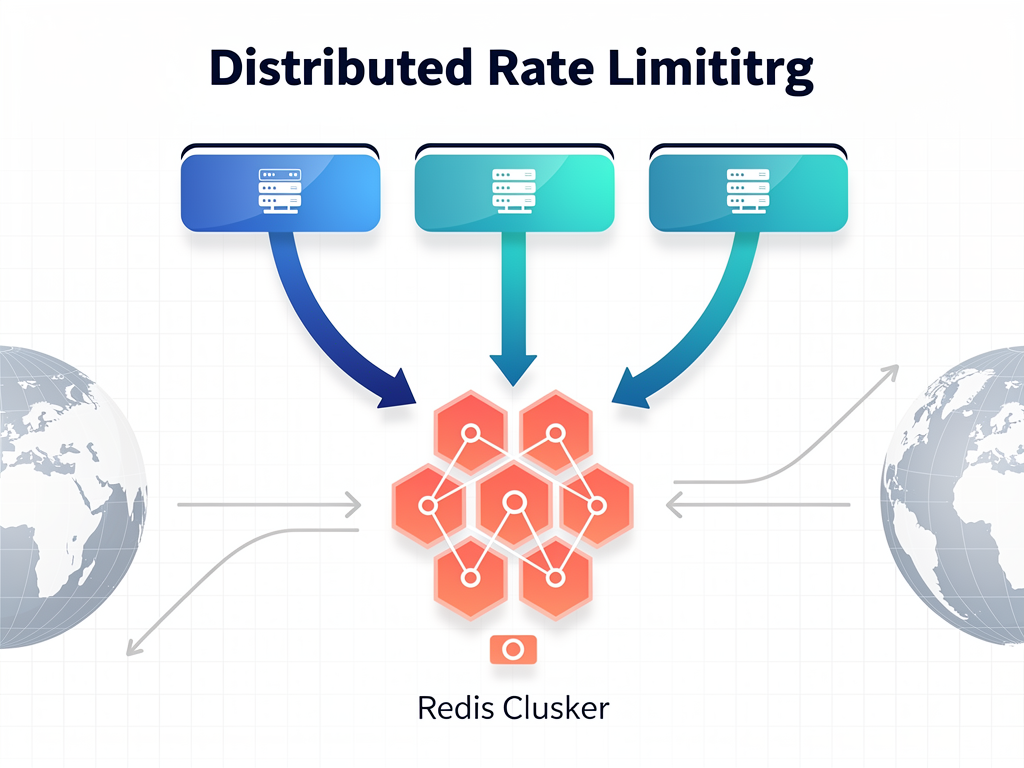
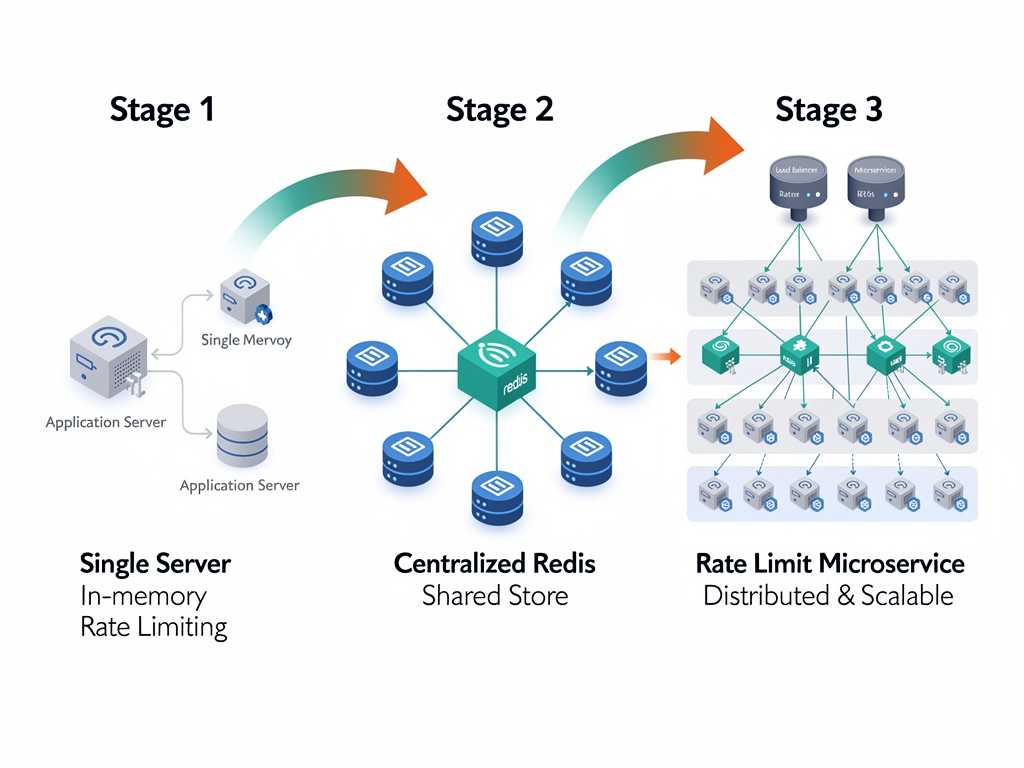
Single-server rate limiting is straightforward: maintain counters in memory and increment them with each request. Distributed rate limiting across multiple servers, regions, or serverless functions introduces significant complexity. You need a shared state store that all instances can access with low latency and high availability.
Redis-Based Solutions
Redis has become the de facto standard for distributed rate limiting due to its speed, atomic operations, and built-in data structures. The INCR command atomically increments a counter, while EXPIRE automatically cleans up old counters. For sliding window implementations, sorted sets provide efficient timestamp-based queries.
When deploying Redis for rate limiting, consider using Redis Cluster for horizontal scalability or managed services like AWS ElastiCache or Upstash for reduced operational burden. Ensure your Redis deployment is in the same region as your application servers to minimize latency, as every API request will incur a Redis round-trip.
Handling Redis Failures
Your rate limiting system must handle Redis failures gracefully. If Redis becomes unavailable, you have two choices: fail open (allow all requests) or fail closed (reject all requests). Neither is ideal, but for most SaaS platforms, failing open is preferable because it maintains service availability at the cost of temporarily losing rate limit enforcement.
Implement circuit breakers that detect Redis failures and switch to degraded mode. You might fall back to in-memory rate limiting per instance, accepting that limits will be less accurate but still providing some protection. Log these events prominently so you can investigate and resolve Redis issues quickly.
Dynamic Rate Limit Adjustments
Static rate limits work for many scenarios, but sophisticated platforms benefit from dynamic adjustments that respond to real-time conditions. Dynamic rate limiting can protect your system during traffic spikes, reward well-behaved tenants, and penalize abusive behavior automatically.
Load-Based Adjustments
When your system approaches capacity limits, dynamically reducing rate limits can prevent complete failure. Monitor key metrics like CPU utilization, memory usage, database connection pool exhaustion, and response latency. When these metrics exceed thresholds, automatically tighten rate limits to reduce load.
Implement graduated responses rather than sudden cutoffs. If CPU utilization exceeds 70%, reduce all rate limits by 10%. At 80%, reduce by 25%. At 90%, reduce by 50% and alert your operations team. This graduated approach maintains service for most tenants while preventing complete system failure.
Behavior-Based Adjustments
Tenants who consistently stay well within their limits and make efficient API calls might deserve higher limits as a reward. Conversely, tenants who frequently hit their limits or make inefficient calls (like requesting the same data repeatedly) might have their limits temporarily reduced.
Implement a reputation system that tracks tenant behavior over time. Good behavior earns credits that translate to higher effective limits. Bad behavior (like ignoring rate limit responses and continuing to send requests) earns penalties. This approach encourages efficient API usage and naturally segments your tenants by behavior quality.
Time-Based Adjustments
Many platforms experience predictable traffic patterns based on time of day, day of week, or business cycles. You might offer higher limits during off-peak hours when you have spare capacity, encouraging tenants to shift batch processing to these times. Conversely, you might tighten limits during known peak periods to ensure fair access for all tenants.
For platforms serving global audiences, consider timezone-aware rate limiting. A tenant based in Europe might have different peak hours than a tenant in North America. Applying the same time-based adjustments to both would be inappropriate and potentially unfair.
Communicating Rate Limits to API Consumers
How you communicate rate limits to your API consumers significantly impacts their experience and your support burden. Clear communication helps developers build applications that respect your limits, handle rate limit responses gracefully, and avoid frustrating retry loops.
HTTP Headers for Rate Limit Information
Include rate limit information in response headers for every API call, not just when limits are exceeded. The emerging standard uses headers like X-RateLimit-Limit, X-RateLimit-Remaining, and X-RateLimit-Reset. Some platforms also use the newer RateLimit header defined in the IETF draft specification.
| Header | Description | Example Value |
|---|---|---|
| X-RateLimit-Limit | Maximum requests allowed in the window | 1000 |
| X-RateLimit-Remaining | Requests remaining in current window | 847 |
| X-RateLimit-Reset | Unix timestamp when the window resets | 1699574400 |
| Retry-After | Seconds to wait before retrying (on 429) | 30 |
Error Response Design
When a request exceeds rate limits, return a 429 Too Many Requests status code with a helpful error body. Include information about which limit was exceeded (per-minute, per-day, concurrent connections), when the limit will reset, and what the tenant can do (wait, upgrade their plan, contact support).
Avoid generic error messages like "Rate limit exceeded." Instead, provide actionable information: "You have exceeded your daily API limit of 10,000 requests. Your limit resets in 4 hours and 23 minutes. Consider upgrading to the Professional plan for 50,000 daily requests."

Monitoring and Alerting for Rate Limit Events
Implementing rate limiting is only the beginning. Ongoing monitoring helps you understand how tenants use your API, identify problematic patterns, and optimize your rate limit configurations over time. Without visibility into rate limit events, you are flying blind.
Key Metrics to Track
Track rate limit hits per tenant, per endpoint, and per time period. Identify tenants who frequently hit limits, as they might need to upgrade or might have misconfigured applications. Track the percentage of requests that are rate limited across your entire platform; if this percentage is high, your limits might be too restrictive.
Monitor the distribution of requests across tenants. In a healthy multi-tenant system, no single tenant should dominate API usage unless they are paying for that privilege. If one tenant consistently uses 50% of your API capacity, you have a concentration risk that could become a problem if that tenant churns or experiences issues.
Alerting Strategies
Set up alerts for unusual rate limit patterns. A tenant who has never hit rate limits suddenly hitting them repeatedly might indicate a compromised API key or a misconfigured application update. A sudden spike in rate limit hits across many tenants might indicate a platform issue rather than tenant behavior.
Create dashboards that your support team can use when tenants contact them about rate limit issues. The dashboard should show the tenant's current usage, recent rate limit events, their tier limits, and historical patterns. This information helps support resolve issues quickly and identify whether the tenant needs to upgrade or has a legitimate complaint about limit configuration.
Handling Edge Cases and Abuse Scenarios
Real-world multi-tenant platforms encounter edge cases and abuse scenarios that simple rate limiting cannot address. Sophisticated attackers or misconfigured applications can find ways around basic limits, requiring additional protective measures.
Distributed Denial of Service Considerations
Rate limiting provides some protection against denial of service attacks, but determined attackers can distribute their requests across many IP addresses or create multiple free-tier accounts. Layer your defenses with additional measures like IP reputation checking, CAPTCHA challenges for suspicious patterns, and anomaly detection that identifies coordinated attacks.
Consider implementing progressive challenges for suspicious traffic. The first few requests from a new API key might require additional verification. Once the key establishes a legitimate usage pattern, reduce friction. If the key later exhibits suspicious behavior, increase verification requirements again.
Quota Gaming Prevention
Some tenants might try to game your quota system by creating multiple accounts, using multiple API keys, or timing their requests to exploit window boundaries. Implement cross-account detection that identifies related accounts based on payment methods, IP addresses, or usage patterns. Apply aggregate limits across related accounts.
For window boundary exploitation, sliding window algorithms provide natural protection. For other gaming attempts, maintain audit logs that allow you to investigate suspicious patterns and take action against tenants who violate your terms of service.

Rate Limiting for Different API Types
Not all APIs are created equal, and your rate limiting strategy should account for different API types and their unique characteristics. A real-time API has different requirements than a batch processing API, and both differ from webhook delivery systems.
REST API Rate Limiting
Traditional REST APIs typically use request-based rate limiting where each HTTP request counts equally toward the limit. However, consider whether all requests should count equally. A simple GET request that returns cached data costs far less than a complex POST request that triggers database writes, third-party API calls, and background job processing.
Implement weighted rate limiting where different endpoints or operations consume different amounts of quota. A simple read might cost 1 point, while a complex write costs 10 points. This approach more accurately reflects the actual resource consumption and prevents tenants from overwhelming your system with expensive operations while staying within nominal request limits.
GraphQL API Rate Limiting
GraphQL presents unique rate limiting challenges because a single request can vary enormously in complexity. A simple query for a user's name costs almost nothing, while a deeply nested query that fetches thousands of related records could bring your database to its knees.
Implement query complexity analysis that calculates a cost score for each GraphQL query based on the fields requested, depth of nesting, and pagination parameters. Rate limit based on complexity points rather than raw request counts. Set maximum complexity limits per query to prevent any single request from being too expensive, regardless of rate limits.
WebSocket and Real-Time API Rate Limiting
WebSocket connections require different rate limiting approaches because they maintain persistent connections rather than discrete requests. Rate limit the number of concurrent connections per tenant, the rate of messages sent over connections, and the size of individual messages.
Consider implementing backpressure mechanisms that slow down message delivery when a client cannot keep up, rather than simply dropping messages. For real-time features in your no-code platform, ensure that rate limiting does not create jarring user experiences where updates suddenly stop appearing.
Testing Your Rate Limiting Implementation
Thorough testing ensures your rate limiting works correctly under various conditions and does not inadvertently block legitimate traffic or allow abusive traffic through. Testing rate limiting requires specialized approaches beyond typical unit and integration tests.
Unit Testing Rate Limit Logic
Test your rate limiting algorithms in isolation with controlled inputs. Verify that the token bucket refills correctly over time, that the leaky bucket processes requests at the expected rate, and that sliding windows calculate counts accurately across window boundaries. Use time mocking to test scenarios that would otherwise require waiting for real time to pass.
Load Testing Under Rate Limits
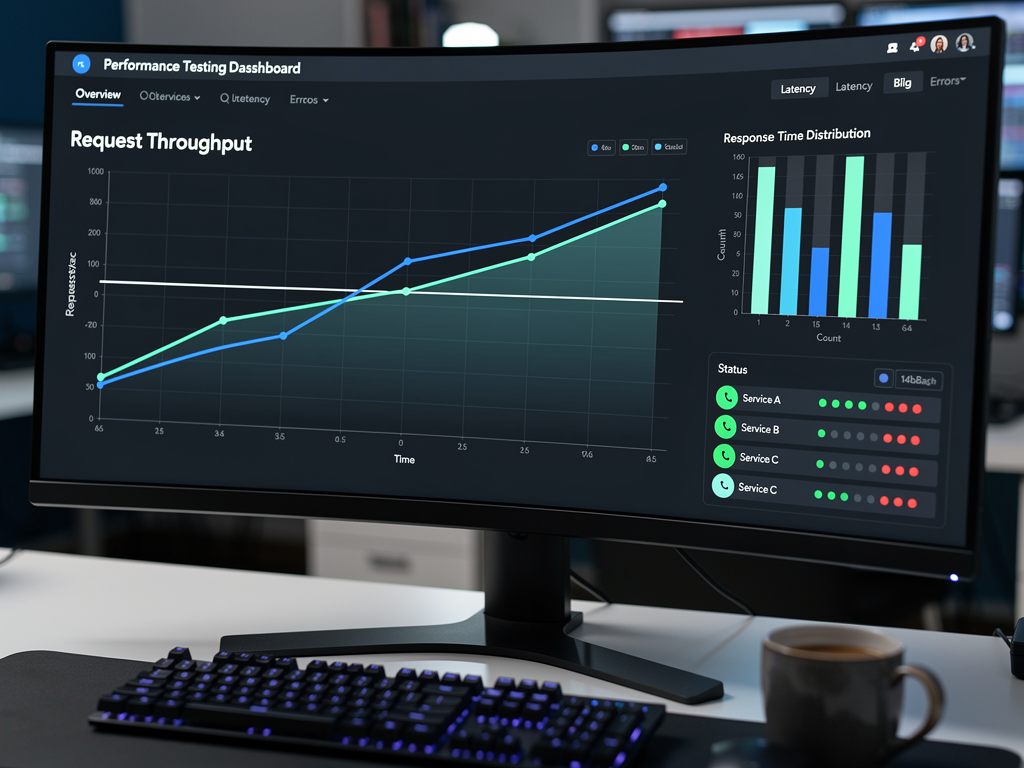
Conduct load tests that specifically exercise your rate limiting behavior. Generate traffic patterns that exceed rate limits and verify that excess requests are rejected with appropriate error responses. Test that rate limiting does not introduce unacceptable latency for requests that are within limits.
Simulate multi-tenant scenarios where some tenants are within limits while others exceed them. Verify that rate limiting for one tenant does not affect other tenants. Test the behavior when your rate limit state store (Redis) becomes slow or unavailable.
Chaos Testing for Resilience
Introduce failures into your rate limiting infrastructure to verify graceful degradation. Kill Redis connections, introduce network latency, and exhaust connection pools. Verify that your application continues to function (perhaps with degraded rate limiting) rather than failing completely.
Test your alerting and monitoring by triggering rate limit events and verifying that alerts fire correctly. Ensure your dashboards accurately reflect rate limit state during both normal operation and failure scenarios.
Integrating Rate Limiting with Your SaaS Business Logic
Rate limiting should integrate seamlessly with your broader SaaS platform, including billing, tenant management, and customer communication systems. Isolated rate limiting that does not connect to these systems creates operational overhead and poor customer experiences.
Billing Integration
Connect rate limit usage to your billing system for usage-based pricing models. Track API calls per billing period and generate invoices that reflect actual usage. For overage billing, clearly communicate when tenants exceed their included quota and what additional charges they will incur.
If you are using a SaaS starter kit or Next.js SaaS template, look for existing billing integrations that you can extend with usage tracking. Many boilerplates include Stripe integration that supports metered billing, allowing you to report API usage and have Stripe calculate charges automatically.
Tenant Dashboard Integration
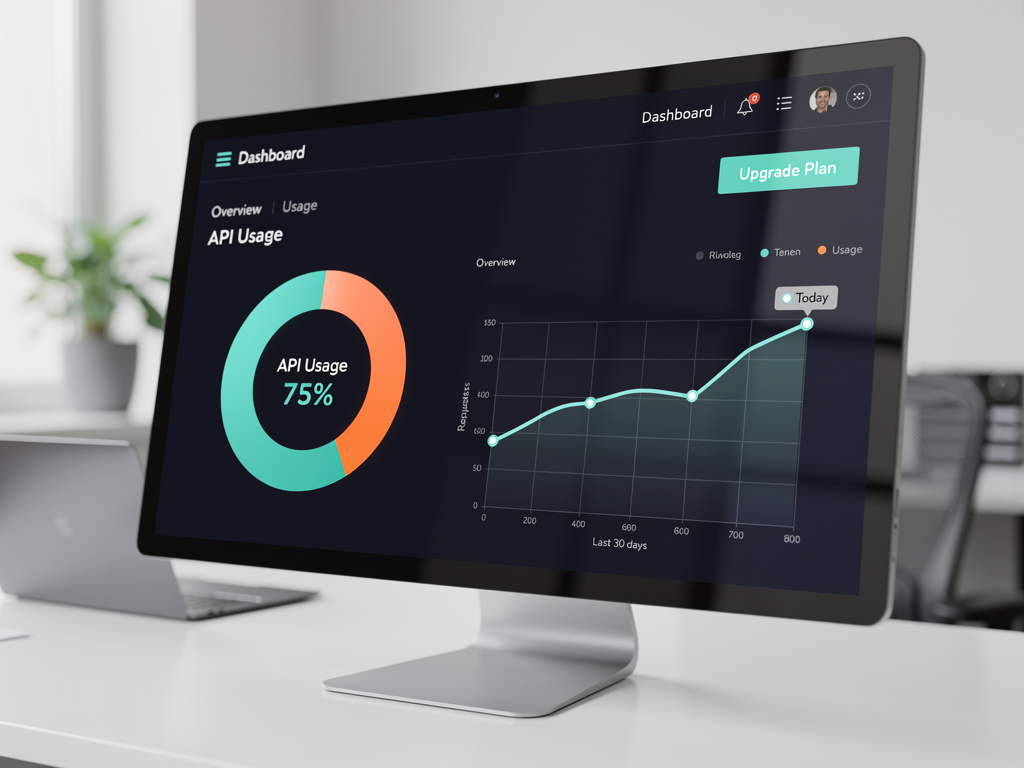
Provide tenants with visibility into their API usage through their dashboard. Show current usage against limits, historical usage trends, and projections for the current billing period. Alert tenants when they approach their limits so they can take action before hitting hard limits.
Include self-service upgrade paths directly in the rate limit context. When a tenant views their usage and sees they are approaching limits, make it easy for them to upgrade their plan immediately. This reduces friction in the upgrade process and captures revenue that might otherwise be lost to rate limit frustration.
Performance Optimization for Rate Limiting
Rate limiting adds overhead to every API request, and this overhead can become significant at scale. Optimizing your rate limiting implementation ensures it protects your system without becoming a bottleneck itself.
Caching Tenant Configuration
Avoid looking up tenant tier and rate limit configuration from your database on every request. Cache this information in memory with appropriate TTL (time to live) values. When a tenant upgrades or their configuration changes, invalidate the cache entry so the new limits take effect promptly.
Use a two-level caching strategy with local in-memory cache for the fastest lookups and Redis for shared cache across instances. The local cache handles the majority of lookups, while Redis ensures consistency when tenants modify their configuration.
Asynchronous Rate Limit Updates
For extremely high-throughput scenarios, consider updating rate limit counters asynchronously rather than synchronously on every request. Batch counter updates and flush them to Redis periodically. This approach trades some accuracy for significant performance improvement.
Be cautious with asynchronous updates, as they can allow brief periods where tenants exceed their limits before the system catches up. This trade-off might be acceptable for soft limits but inappropriate for hard limits that protect critical resources.
Connection Pooling and Pipelining
Optimize your Redis connections with proper pooling to avoid connection establishment overhead on every request. Use Redis pipelining to batch multiple rate limit operations (check and increment) into a single round-trip when possible. These optimizations can reduce rate limiting latency from milliseconds to microseconds.
Rate Limiting Best Practices Checklist
Implementing rate limiting well requires attention to many details. Use this checklist to ensure your implementation covers all the important aspects and provides a solid foundation for your multi-tenant platform.
- Choose appropriate algorithms for your traffic patterns and tenant needs, considering burst handling, smoothing requirements, and accuracy needs.
- Implement per-tenant isolation so that one tenant's behavior cannot affect others, using reliable tenant identification methods.
- Design tier structures that align with your business model and provide clear upgrade paths for growing tenants.
- Use distributed state stores like Redis for consistency across multiple application instances and handle store failures gracefully.
- Communicate limits clearly through HTTP headers on every response and provide actionable error messages when limits are exceeded.
- Monitor and alert on rate limit events to identify problematic tenants and optimize configurations over time.
- Integrate with billing and dashboards to provide tenants visibility into their usage and easy upgrade paths.
- Test thoroughly including unit tests, load tests, and chaos tests to verify correct behavior under all conditions.
- Optimize performance through caching, connection pooling, and appropriate use of asynchronous updates.
- Plan for abuse scenarios with additional protections beyond basic rate limiting for determined attackers.

Future-Proofing Your Rate Limiting Strategy
As your platform grows and evolves, your rate limiting needs will change. Building flexibility into your initial implementation saves significant rework later and allows you to adapt to new requirements without major architectural changes.
Configuration-Driven Limits
Store rate limit configurations in your database or configuration service rather than hardcoding them. This allows you to adjust limits without deploying new code, A/B test different limit configurations, and apply custom limits to specific tenants who need exceptions.
Implement a configuration hierarchy where global defaults can be overridden at the tier level, which can be overridden at the tenant level, which can be overridden at the endpoint level. This flexibility accommodates the inevitable special cases that arise as your platform matures.
Extensible Architecture
Design your rate limiting system with clear interfaces that allow you to swap implementations. You might start with a simple in-memory rate limiter for MVP development, graduate to Redis for production, and eventually move to a specialized rate limiting service as you scale. Clean abstractions make these transitions manageable.
Consider using or building toward a dedicated rate limiting service that other parts of your platform can call. This centralization makes it easier to implement consistent rate limiting across different API types, maintain rate limit state for complex scenarios, and evolve your rate limiting strategy independently of your main application.
Conclusion
Implementing robust rate limiting in your multi-tenant SaaS platform is not optional; it is essential for protecting your infrastructure, ensuring fair resource distribution, and building a sustainable business. The strategies and techniques covered in this guide provide a comprehensive foundation for rate limiting that scales with your platform and adapts to your evolving needs.
Start with clear tenant identification and tier-based limits that align with your business model. Choose algorithms appropriate for your traffic patterns, whether that means token buckets for burst tolerance, leaky buckets for smoothing, or sliding windows for precision. Invest in distributed state management with Redis to maintain consistency across your infrastructure, and implement graceful degradation for when things go wrong.
Communication matters as much as implementation. Clear HTTP headers, actionable error messages, and tenant-facing dashboards transform rate limiting from a frustrating obstacle into a transparent system that tenants can understand and work within. Integration with billing and upgrade flows turns rate limits into natural expansion revenue.
Finally, remember that rate limiting is not a set-and-forget feature. Continuous monitoring, alerting, and optimization ensure your limits remain appropriate as your platform grows and tenant behavior evolves. The investment you make in rate limiting today pays dividends in platform stability, customer satisfaction, and operational peace of mind for years to come.
Frequently Asked Questions
What is the best rate limiting algorithm for a multi-tenant SaaS platform?
The best algorithm depends on your specific requirements and traffic patterns. For most multi-tenant SaaS platforms, the token bucket algorithm provides an excellent balance between burst tolerance and overall rate control. It allows tenants to handle legitimate traffic spikes (like syncing data after being offline) while still enforcing overall limits. If your downstream services have strict throughput requirements and you need to smooth traffic, the leaky bucket algorithm works better. For scenarios requiring precise rate limiting without boundary condition issues, sliding window algorithms provide the highest accuracy at the cost of increased memory usage. Many production platforms use a combination, applying different algorithms to different endpoints based on their characteristics and resource intensity.
How do I handle rate limiting in serverless environments like Vercel or AWS Lambda?
Serverless environments present unique challenges because each function invocation is stateless and you cannot maintain rate limit counters in memory across requests. The solution is to use an external state store, with Redis being the most common choice. Services like Upstash provide serverless-friendly Redis with per-request pricing and global edge deployment. When implementing rate limiting in serverless, optimize for minimal latency by choosing a Redis provider with edge locations near your function deployment regions. Consider using connection pooling solutions designed for serverless to avoid connection establishment overhead. Also implement graceful degradation so your functions continue working (perhaps with degraded rate limiting) if the Redis connection fails.
Should I implement rate limiting at the API gateway level or in my application code?
Ideally, implement rate limiting at both levels for defense in depth. API gateway-level rate limiting (using services like AWS API Gateway, Kong, or Cloudflare) provides a first line of defense that blocks abusive traffic before it reaches your application servers, protecting your compute resources. Application-level rate limiting provides more granular control based on business logic, tenant context, and endpoint-specific requirements that the gateway cannot understand. For example, your gateway might enforce a global limit of 10,000 requests per minute per IP address, while your application enforces tenant-specific limits based on their subscription tier. This layered approach ensures protection even if one layer fails or is misconfigured.
How do I set appropriate rate limits when launching a new platform without usage data?
When launching without historical data, start with conservative limits based on your infrastructure capacity and adjust based on actual usage patterns. Calculate your theoretical maximum throughput based on database connection limits, compute resources, and third-party API quotas. Set initial limits at perhaps 20-30% of this capacity per tenant to leave headroom for growth and unexpected spikes. Monitor usage closely during your early launch period and identify which tenants are hitting limits. Reach out to these tenants to understand their use cases; they might have legitimate needs that inform higher limits, or they might have inefficient implementations you can help them optimize. Plan to revisit and adjust limits monthly during your first year as you gather data about actual usage patterns.
How can I prevent tenants from creating multiple accounts to bypass rate limits?
Preventing quota gaming requires multiple detection and enforcement mechanisms. First, implement payment method verification that flags accounts sharing the same credit card or billing address. Second, track IP addresses and device fingerprints to identify accounts that consistently access your API from the same locations or devices. Third, analyze usage patterns for similarities that suggest coordinated accounts, such as identical API call sequences or synchronized activity. When you detect related accounts, apply aggregate rate limits across all of them rather than allowing each to consume its full individual quota. Include clear terms of service prohibiting multi-accounting and enforce consequences for violations. For high-value enterprise accounts, consider requiring identity verification during onboarding to prevent abuse from the start.
What metrics should I track to optimize my rate limiting configuration over time?
Track several categories of metrics for comprehensive rate limiting optimization. First, monitor rate limit hit rates per tenant, per tier, and per endpoint to identify where limits are too restrictive or too permissive. Second, track the distribution of usage across tenants to identify concentration risks and ensure no single tenant dominates your resources. Third, measure latency impact of your rate limiting implementation to ensure it does not become a bottleneck. Fourth, monitor error rates for rate limit responses to understand how often tenants are being blocked. Fifth, track upgrade conversions correlated with rate limit events to understand whether your limits are driving revenue or frustrating customers away. Create dashboards that combine these metrics and set up alerts for anomalies like sudden spikes in rate limit hits or unusual patterns that might indicate abuse or misconfiguration.
Ready to Build Your Multi-Tenant Platform with Built-In Best Practices?
Implementing rate limiting correctly is just one of many challenges you will face when building a multi-tenant SaaS platform. From tenant isolation and custom domains to billing integration and user management, the complexity adds up quickly. NextBuilder provides a complete foundation for building no-code SaaS platforms with production-ready features including multi-tenant architecture, custom subdomains with SSL, and the infrastructure you need to implement sophisticated rate limiting strategies. Stop rebuilding the wheel and start shipping your platform faster with a battle-tested foundation designed for exactly these challenges.
Subscribe to our newsletter
Subscribe to our newsletter and stay up-to-date with the latest news and updates.