Accelerate Your SaaS Launch with Next.js Starter Kits
Discover how Next.js SaaS starter kits can save you hundreds of hours in development by providing pre-built authentication, payment processing, and user management systems. Learn to build scalable, multi-tenant platforms quickly and efficiently, ensuring a faster time-to-market and robust growth for your business.

Zakariae

Building a SaaS platform from scratch demands hundreds of hours of repetitive work before you can focus on what actually matters: your unique value proposition. Authentication systems, payment processing, user management, and database architecture consume weeks of development time that could be spent validating your business idea. For founders and developers targeting the US market, where speed to market often determines success, a nextjs saas starter provides the foundation to launch production-ready platforms in days rather than months.
The modern SaaS landscape rewards those who ship quickly and iterate based on real user feedback. Whether you are building a no-code platform, a client portal system, or a white-label solution for agencies, starting with a battle-tested foundation eliminates the technical debt that typically accumulates during rushed MVP development. This comprehensive guide walks you through everything you need to know about leveraging Next.js starter kits to build scalable, multi-tenant platforms that can grow with your business.
Key Takeaways
- Accelerated time-to-market: Production-ready starters can save 600+ hours of development time by providing pre-built authentication, payments, and user management systems.
- Multi-tenant architecture: Modern SaaS platforms require isolated tenant environments with custom subdomains and SSL, which specialized boilerplates handle out of the box.
- Cost-effective infrastructure: Self-hosting guides included with quality starters enable enterprise-level platforms for as little as $15 per month using services like Hetzner and Coolify.
- Scalable foundations: Built on Next.js 16, TypeScript, and Prisma, these starters provide the architectural patterns needed to scale from MVP to enterprise.
- Monetization ready: Integrated Stripe payment processing, subscription management, and even affiliate program capabilities let you generate revenue from day one.
- Team collaboration: Role-based access control with multiple permission levels enables secure team environments for your clients and their users.

Understanding the SaaS Starter Kit Landscape
The ecosystem of Next.js SaaS template options has exploded over the past two years, driven by the framework's dominance in the React ecosystem and its excellent support for server-side rendering, API routes, and edge functions. According to the official Next.js SaaS starter repository, the basic template includes authentication, Stripe integration, and dashboard functionality, but many production scenarios require significantly more sophisticated features.
When evaluating starter kits, founders must consider their specific use case. A simple subscription service has different requirements than a multi-tenant platform where each client needs their own subdomain, branding, and user base. The distinction between a basic SaaS template and a comprehensive multi-tenant boilerplate becomes critical when planning for scale. Basic templates handle single-tenant scenarios well but require substantial architectural changes to support multiple isolated client environments.
The US market presents unique considerations for SaaS platforms. Compliance requirements, payment processing regulations, and user expectations around data privacy all influence architectural decisions. A well-designed starter kit addresses these concerns from the foundation, preventing costly refactoring later in the development lifecycle.
Core Features Every Production SaaS Needs
Before diving into implementation details, understanding the essential features that separate hobby projects from production-ready platforms helps you evaluate starter kit options effectively. The difference between launching successfully and struggling with technical debt often comes down to these foundational elements.
Authentication and authorization form the bedrock of any SaaS platform. Modern implementations require support for email and password authentication, social login options, magic links, and increasingly, passwordless authentication methods. The authentication system must integrate seamlessly with your subscription tiers, ensuring users only access features they have paid for.
Payment processing through Stripe has become the de facto standard for US-based SaaS companies. However, basic Stripe integration barely scratches the surface. Production platforms need subscription management, usage-based billing options, invoice generation, tax calculation, and customer portal integration for self-service subscription changes.
Multi-tenancy distinguishes platforms from simple applications. When building no-code tools, client portals, or white-label solutions, each customer needs an isolated environment with their own users, data, and potentially their own branding. This architectural pattern requires careful database design, middleware configuration, and subdomain routing.
| Feature Category | Basic Starter | Production-Ready Platform |
|---|---|---|
| Authentication | Email/password only | Multi-provider, RBAC, session management |
| Payments | Simple checkout | Subscriptions, usage billing, customer portal |
| Tenancy | Single tenant | Multi-tenant with custom domains |
| Transactional only | Marketing campaigns, templates, automation | |
| Analytics | Basic page views | Real-time dashboards, user behavior tracking |

The Next.js Advantage for SaaS Development
Next.js has emerged as the preferred framework for SaaS development due to its unique combination of developer experience, performance optimization, and deployment flexibility. The App Router introduced in recent versions provides a more intuitive way to structure complex applications, with built-in support for layouts, loading states, and error boundaries that SaaS platforms require.
Server Components revolutionize how data fetching works in React applications. For SaaS platforms that frequently display user-specific data, server components reduce client-side JavaScript bundles while maintaining the interactivity users expect. This translates to faster page loads and better SEO performance, both critical factors for US market success.
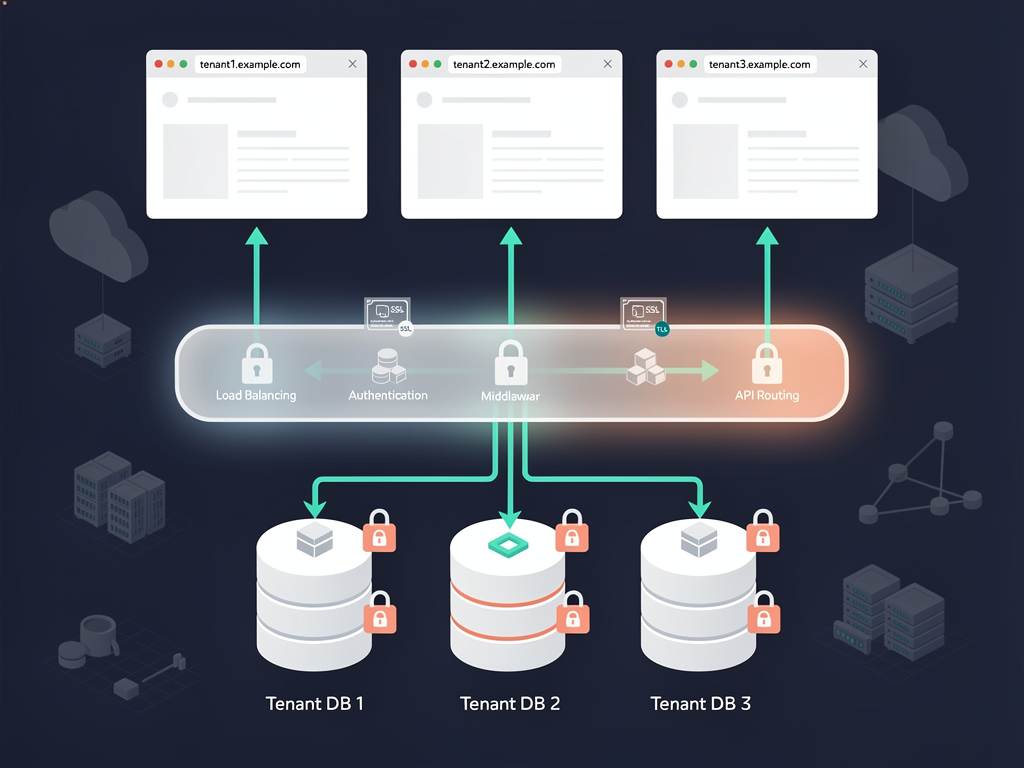
The middleware system in Next.js provides the perfect mechanism for multi-tenant routing. By intercepting requests before they reach your pages, middleware can parse subdomains, validate tenant access, and inject tenant-specific configuration without duplicating logic across your application. This architectural pattern, when implemented correctly, scales elegantly from a handful of tenants to thousands.
API routes and server actions eliminate the need for a separate backend service in many scenarios. For startups focused on rapid iteration, this consolidation reduces operational complexity and deployment overhead. The ability to co-locate frontend and backend code accelerates development velocity while maintaining type safety through TypeScript.
The combination of Next.js server components, middleware, and API routes provides everything needed to build enterprise-grade SaaS platforms without the complexity of microservices architecture during the early stages of growth.
Multi-Tenant Architecture Deep Dive
Multi-tenancy represents the most significant architectural decision for platforms serving multiple clients. The approach you choose impacts everything from database design to deployment strategy, and changing course after launch requires substantial effort. Understanding the options helps you select a starter kit aligned with your long-term vision.
Subdomain-based tenancy provides the cleanest user experience for platforms where clients need branded environments. Each client accesses the platform through their own subdomain (client1.yourplatform.com), with the middleware layer identifying the tenant and loading appropriate configuration. This approach requires wildcard SSL certificates and DNS configuration but delivers a professional experience that clients expect from enterprise software.
Custom domain support takes multi-tenancy further by allowing clients to use their own domains entirely. This feature is essential for white-label solutions where the platform provider remains invisible to end users. Implementing custom domains requires automated SSL certificate provisioning, typically through Let's Encrypt, and careful DNS verification workflows.
The database strategy for multi-tenancy generally falls into three categories: shared database with tenant ID columns, schema-per-tenant, or database-per-tenant. For most startups, the shared database approach with proper indexing and row-level security provides the best balance of simplicity and isolation. As you scale, migrating high-value tenants to dedicated resources becomes an optimization rather than a requirement.
Quality starter kits like NextBuilder's multi-tenant SaaS foundation handle these architectural decisions, providing tested patterns for subdomain routing, custom domain verification, and tenant isolation that would otherwise require months of development and debugging.
Authentication and User Management Strategies
SaaS platforms face unique authentication challenges that consumer applications rarely encounter. Beyond basic login functionality, production platforms must handle organization-level access, role-based permissions, and often a dual authentication system where platform administrators and end users have entirely different access patterns.
NextAuth.js (now Auth.js) has become the standard authentication solution for Next.js applications. Version 5.0 introduces significant improvements in session handling and provider configuration that benefit SaaS use cases. However, integrating NextAuth with multi-tenant architectures requires careful configuration to ensure users can only access their authorized tenants.
The dual authentication pattern separates platform users (your direct customers who pay for subscriptions) from app members (the end users of applications built on your platform). This distinction matters enormously for no-code platforms and client portal systems. Platform users need access to billing, analytics, and configuration, while app members only interact with the applications created for them.
Role-based access control (RBAC) with multiple permission levels enables secure team collaboration. A typical hierarchy includes:
- Owner: Full administrative access including billing and team management
- Admin: Configuration and user management without billing access
- Editor: Content and data modification capabilities
- Viewer: Read-only access to dashboards and reports
- Member: Basic access to assigned features only
Implementing these permission levels from scratch requires careful database design, middleware checks, and UI conditional rendering. A well-architected Next.js starter kit provides these patterns pre-built, allowing you to customize the specific permissions for your use case without rebuilding the underlying infrastructure.
Payment Integration and Monetization
Revenue generation capabilities distinguish viable businesses from technical experiments. While basic Stripe integration appears straightforward, production payment systems involve numerous edge cases and compliance requirements that catch unprepared founders off guard.
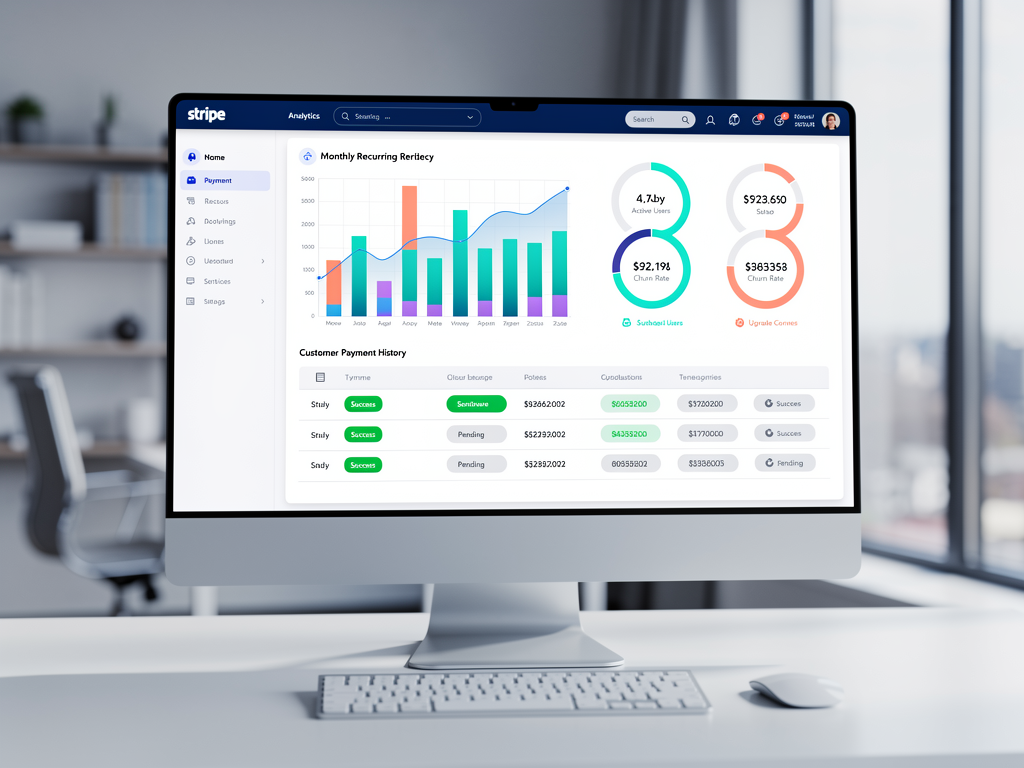
Subscription management forms the core of most SaaS business models. This includes handling plan upgrades and downgrades, proration calculations, trial periods, and grace periods for failed payments. The Stripe Customer Portal simplifies much of this by providing a hosted interface for subscription changes, but integrating it properly with your application state requires careful webhook handling.
Usage-based billing has gained popularity for platforms where consumption varies significantly between users. Implementing metered billing requires tracking usage events, aggregating them correctly, and reporting to Stripe at billing intervals. The complexity increases when combining usage-based components with base subscription fees.
For platforms that enable clients to monetize their own applications, Stripe Connect provides the infrastructure for marketplace-style payments. This allows your clients to accept payments from their users while you collect platform fees. The regulatory and compliance implications of facilitating payments require careful attention, particularly for US-based platforms subject to money transmission laws.
Affiliate programs provide another monetization vector by incentivizing existing users to refer new customers. Building affiliate tracking, commission calculation, and payout management from scratch represents significant development effort. Starter kits with built-in affiliate functionality accelerate this revenue channel without custom development.
| Monetization Feature | Implementation Complexity | Revenue Impact |
|---|---|---|
| Basic Subscriptions | Low | High (primary revenue) |
| Usage-Based Billing | Medium | Variable (usage dependent) |
| Marketplace Payments | High | High (platform fees) |
| Affiliate Program | Medium | Medium (acquisition cost reduction) |
| White-Label Licensing | Low | High (enterprise deals) |
Database Architecture and ORM Selection
The database layer underpins every feature in your SaaS platform, making architectural decisions here particularly consequential. PostgreSQL has emerged as the preferred database for SaaS applications due to its reliability, feature set, and excellent support from managed providers.
Prisma has become the dominant ORM in the Next.js ecosystem, providing type-safe database access that catches errors at compile time rather than runtime. The Prisma schema serves as a single source of truth for your data model, generating TypeScript types automatically and enabling powerful query building with full IDE support.
For multi-tenant applications, the Prisma schema must include tenant relationships throughout. Every user-facing table typically includes a tenantId field with appropriate indexes. Row-level security policies in PostgreSQL provide an additional layer of protection, ensuring that even application bugs cannot leak data between tenants.
Database hosting options for US-based SaaS platforms include:
- Neon: Serverless PostgreSQL with automatic scaling and branching for development workflows
- Supabase: PostgreSQL with additional features like real-time subscriptions and built-in authentication
- PlanetScale: MySQL-compatible with excellent horizontal scaling (though requiring schema changes for foreign keys)
- Self-hosted: Maximum control and cost efficiency at the expense of operational overhead
The choice between managed services and self-hosting depends on your team's operational capabilities and cost sensitivity. For early-stage startups, managed services reduce operational burden. As you scale and costs increase, self-hosting guides included with quality starter kits enable migration to cost-effective infrastructure without architectural changes.
State management in Next.js applications typically combines server-side data fetching with client-side caching. Zustand provides lightweight global state management for UI concerns, while React Query (TanStack Query) handles server state with automatic caching, background refetching, and optimistic updates. This combination provides excellent user experience without the complexity of Redux.
Email Systems and Communication Infrastructure
Email remains the primary communication channel for SaaS platforms, serving both transactional and marketing purposes. Building a robust email system involves template management, delivery infrastructure, and analytics to ensure messages reach users effectively.
Transactional emails include welcome messages, password resets, invoice receipts, and notification alerts. These messages must be reliable and timely, requiring integration with dedicated email delivery services like SendGrid, Postmark, or Amazon SES. Quality starter kits include 10+ pre-designed transactional email templates that maintain brand consistency while handling common scenarios.
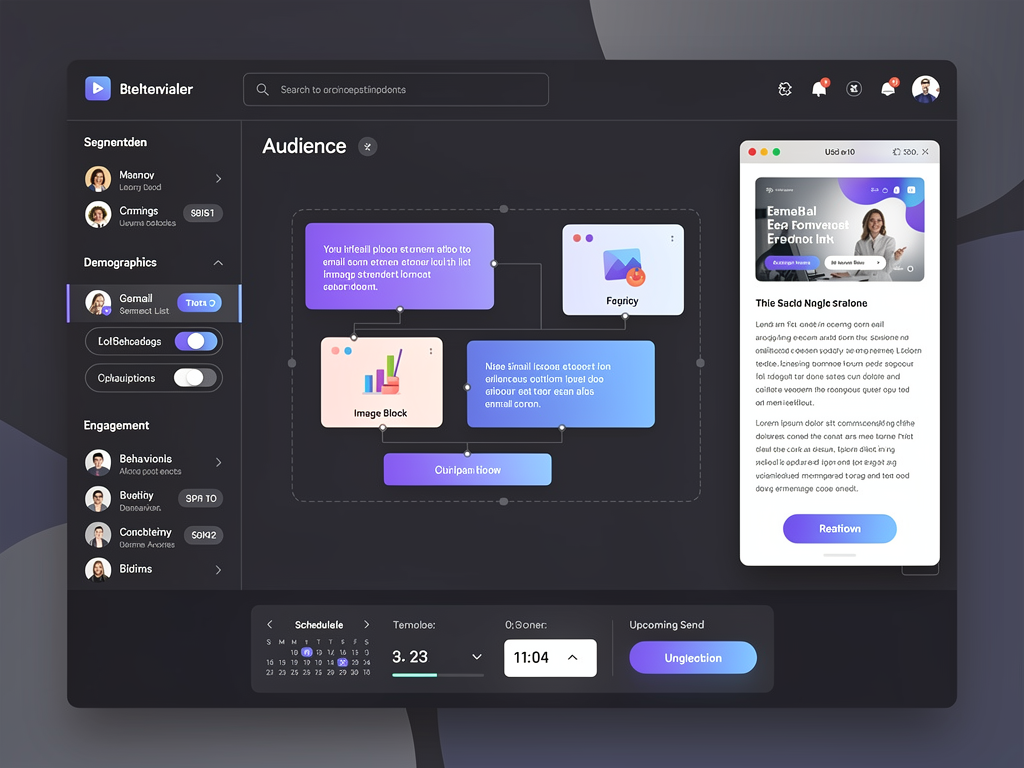
Email marketing capabilities enable ongoing engagement with users through newsletters, product updates, and promotional campaigns. Building a campaign builder with audience segmentation, scheduling, and analytics from scratch represents substantial development effort. Integrated email marketing systems allow founders to nurture leads and retain customers without third-party tool subscriptions.
The technical implementation involves:
- Template rendering: React Email or MJML for responsive, cross-client compatible templates
- Queue management: Background job processing for bulk sends without blocking application performance
- Bounce handling: Webhook integration to maintain list hygiene and sender reputation
- Analytics tracking: Open rates, click tracking, and conversion attribution
Admin Dashboards and Analytics
Visibility into platform performance enables data-driven decision making. Admin dashboards aggregate metrics across tenants, users, and revenue to provide the insights founders need to grow their businesses effectively.
Real-time analytics display current platform activity, including active users, ongoing sessions, and recent signups. This immediate feedback helps identify issues quickly and understand usage patterns as they develop. Implementing real-time updates requires WebSocket connections or server-sent events, adding complexity that pre-built solutions handle elegantly.
Revenue metrics track monthly recurring revenue (MRR), annual recurring revenue (ARR), churn rates, and lifetime value (LTV). These SaaS-specific metrics differ from traditional e-commerce analytics and require custom calculation logic. Integration with Stripe webhooks ensures revenue data stays synchronized without manual reconciliation.
User behavior analytics reveal how customers interact with your platform, identifying popular features, friction points, and opportunities for improvement. Activity logging systems capture user events in a structured format, enabling both real-time dashboards and historical analysis.
The admin dashboard should provide:
- Overview metrics with trend indicators
- Tenant management with search and filtering
- User administration including impersonation for support
- Subscription and billing oversight
- System health monitoring and error tracking
- Feature flag management for gradual rollouts
Effective admin dashboards balance comprehensive data access with usability. Overwhelming founders with metrics they cannot act upon creates noise rather than insight. Focus on actionable metrics that drive business decisions.
Content Management and SEO Optimization
SaaS platforms require content capabilities for marketing sites, documentation, and user-generated content within applications. The approach to content management significantly impacts both development velocity and search engine visibility.
MDX-based blogs combine Markdown simplicity with React component power. This approach allows marketing teams to create content without developer involvement while enabling rich interactive elements when needed. MDX files can live in the repository, enabling version control and review workflows that maintain content quality.
SEO optimization for SaaS platforms involves technical foundations and content strategy. Next.js provides excellent SEO capabilities through metadata APIs, automatic sitemap generation, and server-side rendering that ensures search engines see complete page content. However, implementing these features correctly requires understanding both the framework capabilities and search engine requirements.
Key SEO considerations include:
- Dynamic metadata: Page-specific titles, descriptions, and Open Graph images
- Structured data: JSON-LD markup for rich search results
- Canonical URLs: Preventing duplicate content issues in multi-tenant environments
- Performance optimization: Core Web Vitals compliance for ranking benefits
- Internal linking: Strategic connections between content pages
For platforms targeting the US market, local SEO considerations may apply if serving specific geographic areas. However, most SaaS platforms benefit from broader optimization strategies focused on feature keywords and problem-solution content.

Self-Hosting Strategies for Cost Optimization
While managed services simplify operations, costs escalate quickly as platforms grow. Understanding self-hosting options enables founders to optimize infrastructure spending without sacrificing reliability or performance.
Hetzner provides exceptional value for compute resources, with dedicated servers and cloud instances at fractions of major cloud provider pricing. For US-based platforms, Hetzner's Ashburn, Virginia data center offers low-latency access to East Coast users while maintaining European privacy standards.
Coolify serves as an open-source alternative to platforms like Heroku and Vercel, providing deployment automation, SSL certificate management, and database provisioning on your own infrastructure. The learning curve is steeper than managed platforms, but the cost savings at scale justify the investment for bootstrapped startups.
A typical self-hosted stack for a production SaaS platform includes:
| Component | Service | Monthly Cost |
|---|---|---|
| Application Server | Hetzner CX31 | $8 |
| Database | Supabase Free/Self-hosted | $0-5 |
| Object Storage | Hetzner Storage Box | $3 |
| Email Delivery | Amazon SES | $1-5 |
| SSL/DNS | Cloudflare Free | $0 |
| Total | $12-21 |
Quality starter kits include detailed self-hosting guides that walk through server provisioning, deployment configuration, and ongoing maintenance tasks. This documentation transforms self-hosting from a daunting prospect into a manageable operational task.
Scaling considerations for self-hosted infrastructure include horizontal scaling through load balancers, database replication for read-heavy workloads, and CDN integration for static assets. Planning for these requirements early prevents architectural constraints as your platform grows.
Development Workflow and Team Collaboration
Efficient development workflows accelerate iteration speed and reduce bugs reaching production. Modern SaaS development benefits from tooling that enforces consistency and catches errors early in the development cycle.
TypeScript provides the foundation for reliable development, catching type errors at compile time and enabling powerful IDE features like autocomplete and refactoring support. For SaaS platforms with complex data models and business logic, TypeScript's benefits compound as the codebase grows.
Code quality tools maintain consistency across team members:
- ESLint: Catches common JavaScript/TypeScript errors and enforces style guidelines
- Prettier: Automatic code formatting eliminates style debates
- Husky: Git hooks ensure quality checks run before commits
- lint-staged: Runs linters only on changed files for speed
Testing strategies for SaaS platforms balance coverage with development velocity. Unit tests for business logic, integration tests for API routes, and end-to-end tests for critical user flows provide confidence without excessive maintenance burden. Tools like Vitest for unit testing and Playwright for E2E testing integrate well with Next.js projects.
CI/CD pipelines automate testing and deployment, ensuring that only validated code reaches production. GitHub Actions provides generous free tiers for open-source and private repositories, enabling automated workflows without additional infrastructure.

UI Components and Design Systems
User interface quality directly impacts user perception of your platform's professionalism and reliability. Building consistent, accessible interfaces requires either significant design investment or leveraging established component libraries.
shadcn/ui has emerged as the preferred component library for Next.js applications, providing beautifully designed, accessible components that you own and customize. Unlike traditional component libraries that abstract implementation details, shadcn/ui copies component source code into your project, enabling deep customization without fighting library constraints.
Tailwind CSS provides the styling foundation, enabling rapid UI development through utility classes. The combination of Tailwind and shadcn/ui creates a powerful design system that maintains consistency while allowing flexibility for brand customization.
Essential UI patterns for SaaS platforms include:
- Dashboard layouts: Sidebar navigation, header bars, and content areas
- Data tables: Sorting, filtering, pagination, and bulk actions
- Form systems: Validation, error handling, and multi-step wizards
- Modal dialogs: Confirmations, forms, and detail views
- Toast notifications: Success, error, and informational messages
- Loading states: Skeletons, spinners, and progress indicators
Accessibility considerations ensure your platform serves all users effectively. shadcn/ui components include proper ARIA attributes, keyboard navigation, and screen reader support by default. Maintaining these standards as you customize components requires ongoing attention but demonstrates professionalism and expands your addressable market.
Comparing Popular Next.js Boilerplate Options
The market offers numerous Next.js starter kit options, each with different strengths and target use cases. Understanding the landscape helps you select the foundation that best matches your specific requirements.
The official Next.js SaaS starter from Vercel provides a minimal foundation with authentication, Stripe integration, and basic dashboard functionality. It serves as an excellent learning resource and starting point for simple applications but requires substantial extension for multi-tenant or no-code platform scenarios.
Supastarter offers a comprehensive SaaS boilerplate with extensive documentation and active development. Their focus on developer experience and AI coding agent compatibility makes it attractive for teams leveraging AI-assisted development. The pricing reflects the comprehensive feature set and ongoing support.
For founders specifically building multi-tenant no-code platforms, specialized solutions like SaaSCore's Next.js boilerplate provide features tailored to these use cases. The ability to let clients create unlimited apps with custom subdomains and SSL distinguishes platform-focused starters from general SaaS templates.
Evaluation criteria should include:
- Feature completeness: Does the starter include everything you need, or will you build significant functionality yourself?
- Code quality: Is the codebase well-structured, documented, and maintainable?
- Update frequency: Does the maintainer keep dependencies current and add new features?
- Community and support: Are questions answered promptly? Is there a community of other users?
- License terms: Can you use the starter for your intended purpose without restrictions?
- Price-to-value ratio: Does the time saved justify the cost compared to alternatives?

Building No-Code Platforms with Next.js
No-code platforms represent a particularly compelling SaaS category, enabling non-technical users to build applications without programming knowledge. The technical requirements for no-code platforms extend beyond typical SaaS features, requiring dynamic schema systems, visual builders, and extensive customization capabilities.
Dynamic data modeling allows platform users to define their own data structures without database migrations. This typically involves a flexible schema system where field definitions are stored as data rather than code, with a rendering layer that interprets these definitions at runtime.
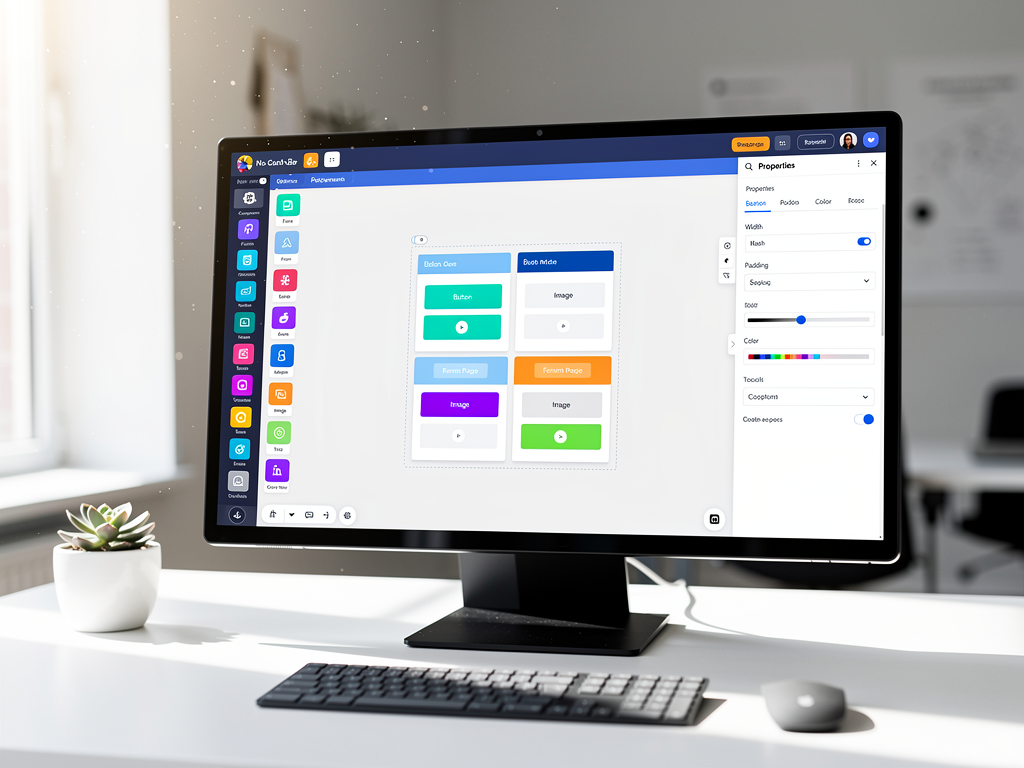
Visual builders for forms, pages, and workflows require sophisticated frontend engineering. Drag-and-drop interfaces, real-time previews, and undo/redo functionality create the intuitive experience users expect from no-code tools. Building these interfaces from scratch represents months of specialized development.
Template systems accelerate user success by providing starting points for common use cases. A no-code platform for building landing pages might include templates for product launches, event registrations, and portfolio sites. These templates demonstrate platform capabilities while reducing time-to-value for new users.
The platform-within-a-platform architecture required for no-code tools demands careful attention to:
- Performance at scale with many dynamic components
- Security isolation between tenant applications
- Version control for user-created content
- Export and portability options
- API access for power users and integrations
Starting with a Next.js boilerplate designed for multi-tenant platforms provides the architectural foundation these requirements demand, allowing you to focus development effort on the unique value proposition of your no-code tool.
Launch Checklist and Production Readiness
Transitioning from development to production requires systematic verification of security, performance, and operational readiness. This checklist ensures your platform meets the standards users expect from professional SaaS products.
Security verification:
- Authentication flows tested for edge cases and error handling
- Authorization checks verified at both API and UI levels
- Input validation implemented for all user-submitted data
- SQL injection and XSS vulnerabilities addressed
- Secrets and API keys properly managed through environment variables
- HTTPS enforced with proper SSL certificate configuration
- Rate limiting implemented for authentication and API endpoints
Performance optimization:
- Core Web Vitals meeting Google's recommended thresholds
- Database queries optimized with appropriate indexes
- Image optimization through Next.js Image component
- Static assets served through CDN
- Bundle size analyzed and unnecessary dependencies removed
- Caching strategies implemented for frequently accessed data
Operational readiness:
- Error tracking configured (Sentry, LogRocket, or similar)
- Uptime monitoring established
- Backup procedures tested and documented
- Incident response procedures defined
- Customer support channels established
- Documentation and help content prepared
Legal and compliance:
- Privacy policy published and accessible
- Terms of service defined
- Cookie consent implemented where required
- Data processing agreements prepared for enterprise customers
- GDPR and CCPA compliance verified for applicable users

Conclusion
Building a production-ready SaaS platform no longer requires starting from zero. The ecosystem of Next.js starter kits has matured to provide comprehensive foundations that address authentication, payments, multi-tenancy, and dozens of other requirements that every successful platform needs. For founders targeting the US market, where competition rewards speed and execution, leveraging these foundations represents a strategic advantage.
The decision between building from scratch and starting with a SaaS starter kit ultimately comes down to where you want to invest your limited time and resources. Custom development of authentication systems, payment processing, and multi-tenant architecture consumes months that could be spent validating your business model and acquiring customers. The 600+ hours saved by starting with a production-ready foundation translates directly into faster market entry and earlier revenue.
Whether you are building a no-code platform, a client portal system, or a white-label solution for agencies, the architectural patterns and implementation details covered in this guide provide the knowledge needed to evaluate options and make informed decisions. The combination of Next.js capabilities, modern tooling, and battle-tested starter kits creates an unprecedented opportunity for founders to launch sophisticated SaaS platforms in days rather than months.
Your next step is clear: identify the starter kit that matches your specific requirements, invest the time to understand its architecture, and begin building the features that differentiate your platform from competitors. The foundation is ready; your unique value proposition awaits implementation.
Frequently Asked Questions
How long does it take to launch a SaaS platform using a Next.js starter kit?
The timeline varies based on your platform's complexity and customization requirements, but most founders report launching MVPs within two to four weeks when starting with a comprehensive starter kit. This compares favorably to the three to six months typically required when building from scratch. The initial setup, including environment configuration, database provisioning, and payment integration, typically takes one to two days with proper documentation. The remaining time focuses on customizing the UI to match your brand, implementing your unique features, and testing the complete user journey. For simple subscription-based products, some founders have launched within a single week. More complex multi-tenant platforms with custom domain support and extensive customization may require four to eight weeks for a production-ready launch.
What is the difference between a SaaS template and a multi-tenant boilerplate?
A standard SaaS template provides the foundation for single-tenant applications where each deployment serves one organization. These templates typically include user authentication, subscription billing, and basic dashboard functionality. A multi-tenant boilerplate extends this foundation to support multiple isolated client environments within a single deployment. Each tenant receives their own subdomain or custom domain, separate user base, and isolated data. The architectural differences are significant: multi-tenant systems require tenant identification middleware, database schemas with tenant relationships, and careful attention to data isolation. For platforms where clients need their own branded environments, such as no-code builders, client portals, or white-label solutions, multi-tenant architecture is essential. Single-tenant templates would require deploying separate instances for each client, dramatically increasing operational complexity and cost.
Can I self-host a Next.js SaaS platform, or do I need Vercel?
Next.js applications can absolutely be self-hosted, and many production SaaS platforms run on infrastructure other than Vercel. While Vercel provides the most seamless deployment experience for Next.js, the framework supports deployment to any Node.js environment. Popular self-hosting options include Docker containers on cloud providers like AWS, Google Cloud, or Hetzner, as well as platforms like Railway, Render, and Coolify. Self-hosting requires more operational knowledge but offers significant cost savings at scale. A production SaaS platform can run on infrastructure costing $15 to $50 per month through self-hosting, compared to $150 or more on managed platforms as traffic grows. Quality starter kits include detailed self-hosting guides covering server provisioning, SSL configuration, database setup, and deployment automation. The tradeoff is operational responsibility: you manage updates, security patches, and scaling rather than relying on a managed platform.
How do I handle custom domains for my clients in a multi-tenant platform?
Custom domain support requires three main components: DNS verification, SSL certificate provisioning, and application routing. When a client adds their custom domain, your platform first verifies ownership through DNS records, typically a CNAME or TXT record pointing to your infrastructure. Once verified, SSL certificates are provisioned automatically through services like Let's Encrypt, which provides free certificates with automated renewal. Your application middleware then maps incoming requests from custom domains to the appropriate tenant configuration. This process involves database lookups to match domains to tenants and loading tenant-specific settings. Most cloud providers and platforms like Coolify support wildcard certificates and automated Let's Encrypt integration. Quality multi-tenant starter kits include this functionality pre-built, handling the verification workflow, certificate management, and routing logic. Implementation from scratch requires understanding DNS propagation, certificate automation, and edge cases like domain transfers and expiration.
What payment features should I expect from a production-ready starter kit?
A comprehensive starter kit should include Stripe integration covering the complete subscription lifecycle. This means checkout session creation for new subscriptions, customer portal integration for self-service plan changes, webhook handling for payment events, and proper error handling for failed payments. Beyond basic subscriptions, look for support for multiple pricing tiers, trial periods, and proration when customers change plans mid-cycle. Usage-based billing components are valuable if your business model involves metered pricing. For platforms that enable clients to accept payments, Stripe Connect integration provides marketplace functionality with platform fee collection. Invoice generation, tax calculation through Stripe Tax, and proper handling of refunds and disputes round out production requirements. The starter kit should also include proper webhook signature verification, idempotency handling for payment operations, and graceful degradation when Stripe experiences issues.
How do I ensure data isolation between tenants in a multi-tenant application?
Data isolation in multi-tenant applications operates at multiple levels for defense in depth. At the application level, every database query must include tenant filtering, typically through a tenantId field present on all tenant-specific tables. ORM middleware can automatically inject these filters, preventing accidental cross-tenant data access. At the database level, PostgreSQL row-level security policies provide an additional safeguard, enforcing tenant isolation even if application code contains bugs. Connection-level tenant context ensures policies apply correctly. For highly sensitive applications, schema-per-tenant or database-per-tenant architectures provide stronger isolation at the cost of operational complexity. API routes and server actions must verify tenant authorization before processing requests, checking that the authenticated user belongs to the requested tenant. Quality starter kits implement these patterns throughout the codebase, providing tested isolation that would otherwise require extensive security review and testing to build correctly.
Ready to Build Your Multi-Tenant SaaS Platform?
Stop spending months on boilerplate code and start focusing on what makes your platform unique. NextBuilder provides the complete Next.js foundation for building multi-tenant SaaS platforms, including custom subdomains with SSL, dual authentication systems, integrated payments, email marketing, and everything else you need to launch in days instead of months. With a self-hosting guide that enables enterprise-level platforms for as little as $15 per month, you can validate your business model without burning through runway on infrastructure costs. Visit NextBuilder.dev today to explore the demo and see how 600+ hours of development time can be redirected toward building your competitive advantage.
Subscribe to our newsletter
Subscribe to our newsletter and stay up-to-date with the latest news and updates.